How to Use Google Gemini AI Image Model 2025: Create, Edit, Merge
How to Use Google Gemini AI Image Model 2025: Create, Edit, Merge, Transform
Google has transformed the digital creativity landscape with its latest update to the Gemini app, introducing an advanced AI image editing model powered by Google DeepMind’s Nano Banana, also known as Gemini 2.5 Flash Image. Launched on August 26, 2025, this update empowers users to create, edit, merge, and transform images with remarkable precision and ease, all for free. Whether you’re changing backgrounds, designing outfits, or blending photos, Gemini offers a creative playground for everyone. This SEO-optimized guide provides a step-by-step tutorial on using these features, tailored for trending keywords like "how to use Gemini AI" and "AI image editing 2025."
What’s New in Gemini’s AI Image Model?
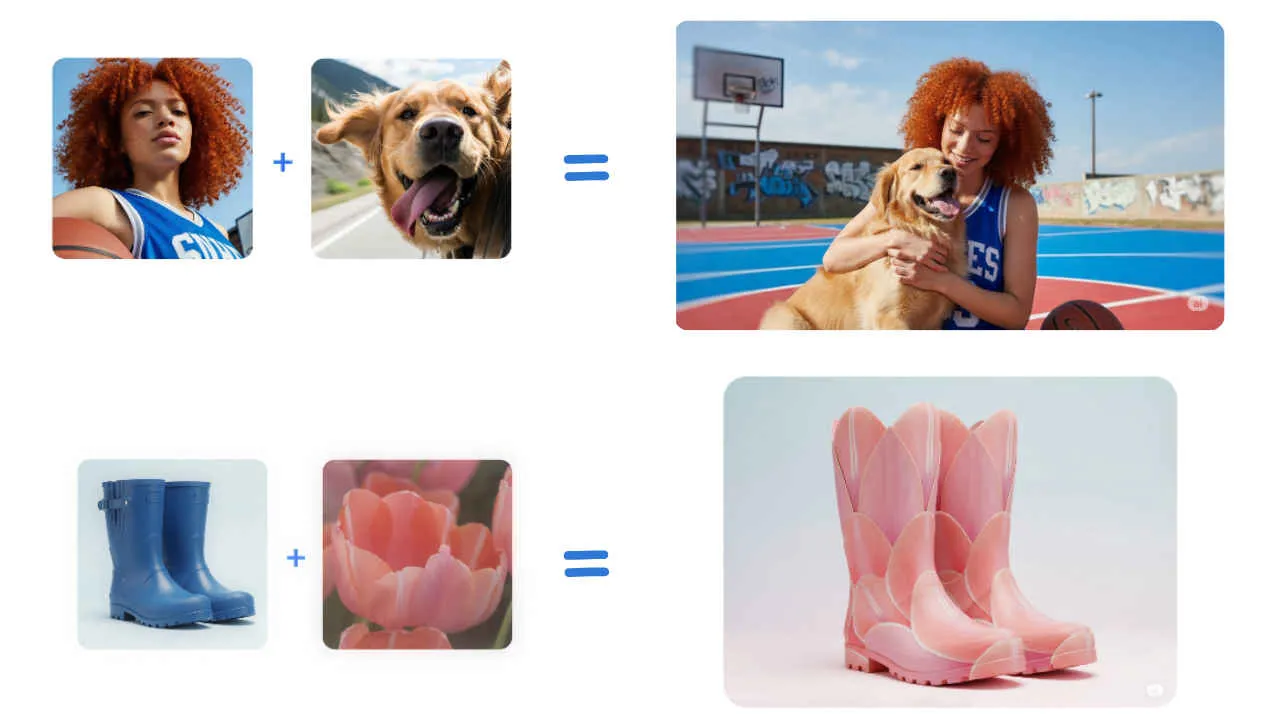
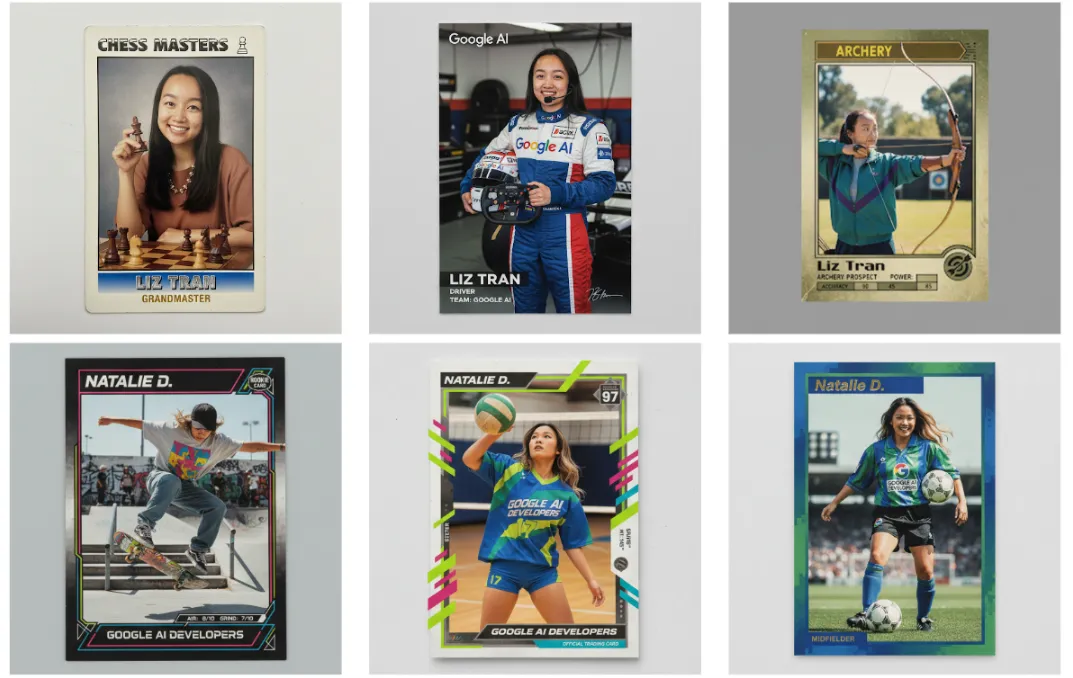
The Gemini 2.5 Flash Image update, powered by the Nano Banana model, redefines AI-driven image editing. Unlike earlier versions, it emphasizes character consistency, ensuring subjects like people or pets remain recognizable during edits. Users can modify backgrounds, swap outfits, or merge multiple images into cohesive scenes with photorealistic results. The model supports multi-turn editing, allowing iterative refinements via natural language prompts. For example, you can change a photo’s background to a beach and later add a sunset without altering the subject’s appearance. Available in over 45 languages, this feature is accessible via the Gemini app, Google AI Studio, and Vertex AI, catering to both casual users and developers.

How to Change Backgrounds and Outfits
Gemini’s AI makes altering a photo’s background or outfit simple and intuitive. Follow these steps to get started:
Step 1: Open the Gemini App – Launch the Gemini app on your Android or iOS device, or access it via gemini.google.com on a computer.
Step 2: Upload Your Image – Select a photo, such as a selfie or a picture of your pet, to edit.
Step 3: Enter a Prompt – Use natural language to describe your desired changes, like “Change the background to a snowy mountain” or “Put a red leather jacket on me.” The AI ensures the subject remains recognizable.
Step 4: Save the Result – Review the edited image and save it to your device for sharing or further use.
This feature is perfect for creating professional-grade edits for social media, presentations, or personal projects, with minimal effort.
How to Merge Photos for Creative Scenes
Gemini’s photo merging capability allows users to combine multiple images into a single, seamless scene. Here’s how to do it:
Step 1: Open the Gemini App – Start the app on your smartphone or web browser.
Step 2: Upload Images – Select the images you want to merge, such as a portrait of yourself and a photo of your pet.
Step 3: Describe the Scene – Enter a prompt like “Place me and my dog on a basketball court” or “Combine us in a tropical jungle.”
Step 4: Save the Merged Image – Once the AI generates the blended image, save it to your device.
This tool is ideal for crafting unique visuals, such as creating dream vacation photos or family montages, with results that look natural and professional.
How to Apply Style Transfers
Style transfers let you apply patterns, colors, or textures from one image to another, unlocking endless creative possibilities. Here’s how to use this feature:
Step 1: Launch Gemini – Open the Gemini app on your device or web platform.
Step 2: Upload Images – Upload two images: one with the style (e.g., a floral pattern) and the target image (e.g., a plain dress).
Step 3: Enter a Prompt – Type a command like “Apply the color of these flowers to my shoes” or “Use the butterfly wing pattern on this t-shirt.”
Step 4: Save the Result – Save the transformed image to your device for sharing or further editing.
This feature is a favorite among fashion enthusiasts and designers, offering a cost-free alternative to professional editing tools.
Why Gemini’s Nano Banana Excels
The Nano Banana model, part of Gemini 2.5 Flash Image, has earned praise for its top-tier performance, outranking competitors on platforms like LMArena. Unlike paid tools like Adobe Photoshop or Canva, Gemini provides professional-grade editing at no cost, with an intuitive interface. Its ability to preserve subject identity during complex edits, such as outfit changes or scene merges, sets it apart. The model’s deep semantic understanding handles intricate prompts, making it suitable for both novice users and seasoned creators looking to produce high-quality visuals.
Crafting Effective Prompts for Best Results
To achieve optimal results with Gemini, use detailed and specific prompts. Instead of generic instructions like “Make it nice,” try “Create a photorealistic image of a dog in a futuristic city at sunset with neon lights.” Specify elements like lighting, perspective, or mood for enhanced accuracy. For multi-turn edits, build on previous prompts, such as “Now add a glowing lantern to the scene.” This iterative approach leverages Gemini’s conversational AI, ensuring precise refinements. All generated images carry a visible watermark and an invisible SynthID watermark, promoting ethical AI use.
Applications for Creators and Businesses
Gemini’s AI image tools cater to diverse users, from social media influencers to small business owners. Creators can transform selfies into artistic portraits or design promotional graphics, while businesses can produce consistent brand assets like product mockups or real estate visuals. The model’s low latency supports real-time applications, such as virtual try-ons for e-commerce or interactive social media campaigns, enhancing engagement and streamlining workflows.

Availability and Accessibility
Gemini’s image editing features are available globally in over 45 languages, accessible via the Gemini app on iOS, Android, and web platforms. Free users can perform up to 100 edits daily, while Gemini Advanced subscribers enjoy a 1,000-edit limit. Developers can integrate these tools through the Gemini API or Google AI Studio, enabling innovative applications. The gradual rollout ensures compatibility across devices, making Gemini a versatile choice for creators worldwide.
Facebook Comments









-
 Explore the upcoming Tamil film Maaman - cast, sto...
 -
 Read the ACE (2025) movie review starring Vijay Se...
 -
 Check out Maaman's 1st day box office collection a...
 -
 Explore tourist family reviews for Maaman movie –...
Popular Posts
Vote / Poll
Recent Posts



Recommended Posts

-
 Discover the best schools in Nagercoil f...
 -
 Discover the top-rated preschools in Nag...
 -
 Explore the best schools in Nagercoil th...

Comment / Reply From